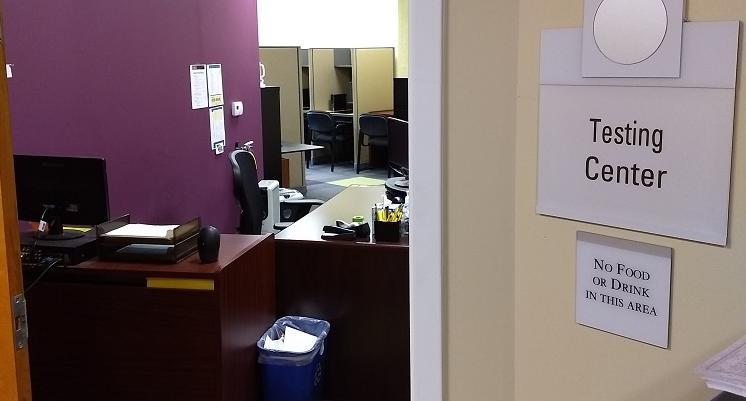
The MCV Testing Center
The Testing Center
The Division for Academic Success (DAS) Testing Center provides a distraction-reduced testing environment for students in the VCU Health Sciences schools who have been approved for testing accommodations. Our goal is to ensure equitable access to examinations by providing approved accommodations in partnership with students, faculty, and academic programs while maintaining the integrity of the testing process.
Note: Due to space limitations, makeup exams are only for students registered with DAS with excused absences approved by the department.
Students approved for testing accommodations should schedule their exams through the AIM Student Portal. Before submitting a testing request, be sure to:
- Share your accommodation letter with your instructor through the Student AIM portal,
- Confirm your exam information, and
- Submit your request at least one week prior to your exam.
Students are encouraged to submit their exam schedule at the beginning of the semester or at least one week prior to the scheduled exam date, but no later than three business days (72 hours).
Requests sent on the weekend will be processed on the following Monday.
The Testing Center does not allow walk-in appointments.
Location of the Testing Center
The Testing Center is located within the Division for Academic Success. It is located in the VMI Building on the Second Floor in Suite 231. It is in the same building as Student Health and University Counseling on the MCV campus. Once you enter the office suite, the Testing Center is on your left through the double doors.
Street Address: VMI Building, 1000 East Marshall Street, Suite 231
Scheduling with the DAS Testing Center
Please confirm exam information with your professor before requesting an appointment with the Testing Center. DAS requests that all testing dates are submitted AT LEAST one week prior to the exam date. The Testing Center is open Mon-Fri 8:00 AM - 5:00 PM.
Please keep in mind that accommodations are not retroactive and will take effect only after you share your letter with your instructors.
- Log into the Student Portal.
- On the left-hand side of the webpage under the “Accommodations” tab, select Alternative Testing.
- Under “Schedule an Exam,” click on the drop-down menu for Select Course. Here is where you will select the class for which you would like to schedule an exam or quiz.
- Select Schedule an Exam
- Under “Available Exam Dates” select the exam you wish to schedule. If your instructor has not entered an exam date select The Exam I’m Scheduling is Not Listed.
- If you are scheduling an exam date that has already been entered by your instructor the date, time, and standard length of the exam will automatically populate.
- OR if you are scheduling an exam that has not been entered by your professor, you will need to enter the date, time, and standard length of the exam.
- Under “Services Requested,” select the testing accommodations you wish to utilize for your exam.
- Read through and check off the agreed-upon terms and conditions.
- Scroll to the bottom of the page and under “Form Submission” select Add Exam Request.
- You may submit additional Exam Requests for the same course, or return to the “Alternative Testing” overview page to submit requests for additional courses.
- Check back in 24-48 hours to see if your request has been approved.
Submitting Course and Exam Instructions with the DAS Testing Center
At the beginning of each semester, we ask that you complete the DAS Course Instruction Form for each of your courses. By completing this form for your courses, you will help the Testing Center ensure we are sufficiently staffed and prepared for upcoming exams.
Please Note: Students may not submit proctoring instructions for their class. Course instructors must submit the proctoring instructions for students taking an exam with DAS. The course instruction can be accessed either by:
o Clicking the link in the email received once a student exam request has been submitted, or
o Logging into the DAS Faculty Portal.
Submitting Course Instructions
- Log in to the Faculty Portal.
- Under the Home section on the left-hand side, select Alternative Testing.
- At the top of the page select DAS Course Instructions.
- Scroll down and beside the course select Specify.
- Select Exam Management Method then Confirm Task. This lets us know if you will proctor your own exams or if you need the assistance of DAS to proctor your exams.
- Below select Submit your Selection.
- Complete the mandatory List of Questions section to inform us of exam scheduling parameters and rescheduling policies for your course.
- Provide your contact phone number where DAS staff may reach you with an urgent question about the exam.
- Once completed, please provide us with the first date of your first exam.
- *Note: For exam length, please write the time in minutes for a standard exam. Please do not include extra time
- Continue to Exam Date Instructions.
- Provide any additional specific exam instructions, exam files, passwords, etc.
- Select Submit and Continue to Specify Exam Dates.
- If you have successfully completed your Course Instructions, you can see (1) List of Exam Dates, (2) modify, duplicate, or delete the proctoring instructions you have provided, or (3) Add Additional Exam Date.
Modifying or Adding Additional Exam Instructions
- Log in to the Faculty Portal.
- Under the Home section on the left-hand side, select Alternative Testing.
- On the top right menu bar select Exam Dates.
- To modify or delete existing exam instructions, do so under the Step 1: Select Exam Dates tab.
- OR to add additional exam dates and exam instructions, do so under the Handy Tools: Add Exam Dates tab.
Testing Center Policies
The Division for Academic Success (DAS) Testing Center provides a distraction-reduced testing environment for students in the VCU Health Sciences schools who have been approved for testing accommodations. Our goal is to ensure equitable access to examinations by providing approved accommodations in partnership with students, faculty, and academic programs while maintaining the integrity of the testing process.
Students approved for testing accommodations should schedule their exams through the AIM Student Portal. Before submitting a testing request, be sure to:
- Share your accommodation letter with your instructor through the Student AIM portal,
- Confirm your exam information, and
- Submit your request at least one week prior to your exam.
Students are encouraged to submit their exam schedule at the beginning of the semester or at least one week prior to the scheduled exam date, but no later than three business days (72 hours).
Requests sent on the weekend will be processed on the following Monday.
The Testing Center does not allow walk-in appointments.
Students are responsible for informing the TCC of any changes to their scheduled exam date and/or time as soon as possible.
Students should prearrange exam start times with the TCC. For the most part, start times will coincide with the class start time except for when a student needs to start early in order to receive their full extended time due to class lecture or lab after the exam.
Students are responsible for arriving on time for each of their scheduled exams. Students must arrive 5-10 minutes prior to their start time to ensure they are able to take care of personal matters and start their exams on time.
Exams should be pre-downloaded prior to coming to the testing center.
If a student is late, please call or email the TCC immediately. Students who arrive and/or start late will lose exam time and may require a rescheduled appointment day/time.
If a student is unable to take an exam because of illness or other conflicts they are responsible for first contacting their professor and then the TCC to reschedule. Rescheduled exams are at the discretion of the professor and the availability of the Testing Center.
Testing Center staff will determine a testing center space for each student once the check-in is complete.
**Please note that if you use a private room as required accommodations and if a room is unavailable, your exam may be scheduled when resources are available.
Students must leave all belongings (including cell phones and smart watches) in the cubicles located by the proctor desk. The Testing Center is not responsible for lost or damaged property. Only items approved by the professor are allowed in the testing area.
Failure to comply with the policies and procedures of the Testing Center may result in a change of Testing Accommodations.
All exams at the Testing Center are bound to VCU’s Honor System & Standards of Academic Conduct.
All areas of the Testing Center are under video surveillance at all times. All testing center sessions are recorded. When under investigation, recorded footage will be shared with the investigating officials upon request.
VCU Nondiscrimination Statement
Virginia Commonwealth University does not discriminate in admissions, treatment, employment or access to its programs or activities on the basis of race, color, religion, national origin (including ethnicity and actual or perceived shared ancestry), age, sex (including pregnancy, childbirth, lactation and related medical conditions), parenting status, marital status, political affiliation, military status (including veteran status), genetic information (including family medical history), sexual orientation, gender identity, gender expression, or disability, as required by Title IX of the Education Amendments of 1972; the Americans with Disabilities Act of 1990, as amended; Section 504 of the Rehabilitation Act of 1973; Titles VI and VII of the Civil Rights
Act of 1964; the Genetic Information Nondiscrimination Act of 2008; the Virginia Human Rights Act; the Virginia Personnel Act; and other state or federal laws and university policies. VCU prohibits sexual harassment and sex-based misconduct, including sexual assault and other forms of interpersonal violence. VCU also prohibits discrimination against employees or applicants for employment because they have inquired about, discussed or disclosed their own pay or the pay of another employee or applicant.
The following person has been designated to handle inquiries regarding accessibility policies, the ADA, Sections 503 and 504, and related statutes and regulations: Katy Washington, Chief Accessibility Officer, 912 West Grace Street, 2nd Floor, Box 842549, Virginia Commonwealth University, Richmond, VA 23284-2549, (804) 828-1347, adaservices@vcu.edu
The following person has been designated to handle inquiries regarding nondiscrimination policies and Title VI: Cleopatra Magwaro, Associate Vice President of Equity and Access Services. Complaints of discrimination, harassment and retaliation may be directed to Equity and Access Services at equity@vcu.edu, (804) 828-1347, 912 W Grace St, 2nd Floor, Box 843022, Richmond, Virginia 23284-3022. Complaints may also be filed with the Department of Education Office for Civil Rights, Equal Employment Opportunity Commission, and the Department of Human Resource Management.
The following person has been designated to serve as the overall coordinator for purposes of Title IX compliance: Elizabeth Scott-Francis, Title IX Coordinator & Director of Outreach and Support, Equity and Access Services, 912 W Grace St, 2nd Floor, Box 843022, Richmond, Virginia 23284-3022, (804) 828-1347, titleix@vcu.edu. Inquiries about the application of Title IX to VCU may be referred to the Title IX Coordinator at titleix@vcu.edu or to the Department of Education Office for Civil Rights.